From Pipelines to Game Loops: a bioinformatician writes a game engine
In bioinformatics, code is often structured as a pipeline—sequential processing of data via specialised tools—but game engines are loops, they iterate, taking input from the user and updating their state to make things happen on the screen. As a result, hardware is often pushed to its limits in the pursuit of realistic physics, detailed visuals and smooth animation to create player immersion. This makes writing game engines one of the most challenging areas of programming, but also one of the most fun, as you get to see, hear and interact with your work.
Game developers typically use feature-rich game engines such as Unity or Godot. This is often the recommended path to budding game developers: start with building very simple games, such as Flappy Bird or Tetris. Playing around a little with these engines, I started developing a prototype of a 2D top-down sci-fi adventure game with a hex-based puzzle mechanic about sequencing an alien genome. I tried Unity but got furthest in my Godot prototype, which was a pleasant development experience with GDScript, a Python-like scripting language. However, I found that I didn’t understand what the engine was actually doing under the hood. Godot is an open-source engine, so I could have looked at the source code, but with such a large code base, this felt overwhelming. I also noticed that I was having to build out a lot of scaffolding for my particular game. General purpose engines have to anticipate a wide range of potential games, so it makes sense that you have to bend the engine towards your very specific requirements. But how much of the actual base provided by the engine did I really need? Could I implement the basics from scratch?
From listening to the Wookash Podcast (which features interviews of game developers and programmers), several guests describe similar stories when asked about their game development journey. Many were also inspired by the Handmade Hero web-series (where developer Casey Muratori builds a game engine in real time over the course of hundreds of hours, using nothing more than C-style C++ and Windows APIs). Building your own game engine isn’t just theoretical, disciples of this school have achieved impressive works, such as the hit indie game Animal Well. To continue to gain a better understanding of how game engines work, as well as learn how to craft larger code bases with inter-dependent systems (a rarity in bioinformatics), I set out to write my own simple 2D engine.
The first step was deciding on a programming language. C++ is most prominently used in game engines, but there are also other options, such as C#, used by Unity and Godot. These engines use C# as a scripting language, but there are also examples of engines that predominantly use C#. I played around with adding some features to a text-based game engine written in C#, and it is an intuitive language to work in. However, C# is rarely used in bioinformatics. Wanting something more transferable, I considered Rust, which is gaining popularity for performance-critical software, including game engines as well as in bioinformatics. Ultimately though, I decided on C++ due to the enormous amount of software already written in C++ (including familiar tools of the trade in my field such as bowtie2 and salmon)—not to mention Python and R can both be extended with C/C++ for performance-critical code.
Interestingly, the C++ used in the Handmade Hero series uses very little of C++’s admittedly dizzying cornucopia of features, opting for a simpler, C-style approach that eschews object oriented programming (OOP). I wanted to dip my toe into some of these features and better understand object oriented design (my computer science degree had already given me a taste of pure-C programming). Larger pieces of software I’d written in bioinformatics had been in a procedural or functional style. I was keen to learn OOP to better understand some of the criticisms (more on this later), as well as being able to better understand tools that were written in this paradigm. I now had three major things to learn: C++, OOP and game engine programming (perhaps this was a bit much—learning one thing at a time is usually more efficient!). Armed with a copy of Programming – Principles and Practice Using C++, I got to work.
The result of spending over a year of my spare time building a game engine is Pangolengine, an open-source, simple top-down 2D game engine with a menu and dialogue system. The engine supports importing maps from the Tiled map editor and dialogue trees from Google sheets, making development of game content very user friendly. You can try out a short demo of the engine online, complete with some simple art assets made in Aseprite (the map is loosely inspired by my almer mater) and chip-tune background music composed with Furnace (open the menu with ESC, select Audio and then turn up the volume). The basic structure of the engine was loosely based on the Let’s Make Games tutorials that walk through building a game engine from scratch using the Simple DirectMedia Library, or SDL. SDL provides a layer of hardware abstraction that allows developers to write cross-platform code while still retaining low level access to graphics, audio, keyboard and mouse controls. This seemed like a good compromise between low level control of the engine without having to deal with large amounts of platform-specific code (it did not look like a lot of fun to work with Windows APIs). While Let’s Make Games uses SDL2, I built the engine from an SDL3 sample template. This structure is slightly different as it uses SDL’s main callbacks, which means the events and application flow of our program is managed without a traditional main loop. The developer just has to implement the functions to initiate the app, capture events, iterate and quit the app, and SDL will handle when they are called.
Pangolengine functions more like a library than an engine. This means that the
game implementation controls the game
loop. An example
implementation can be found in the
demo
directory, where you can see the
main.cpp
file (any of the SDL callback functions can be modified here). The
DemoGame
then needs to implement the IGame interface:
class IGame {
public:
    virtual ~IGame() = default;
    virtual bool onInitialise() = 0;
    virtual void onEvent(SDL_Event* event) = 0;
    virtual void onUpdate() = 0;
    virtual void onRender() = 0;
    virtual void onCleanup() = 0;
};
The game implementation can then make use of Pangolengine’s systems. An overview can be seen in Figure 1 below.
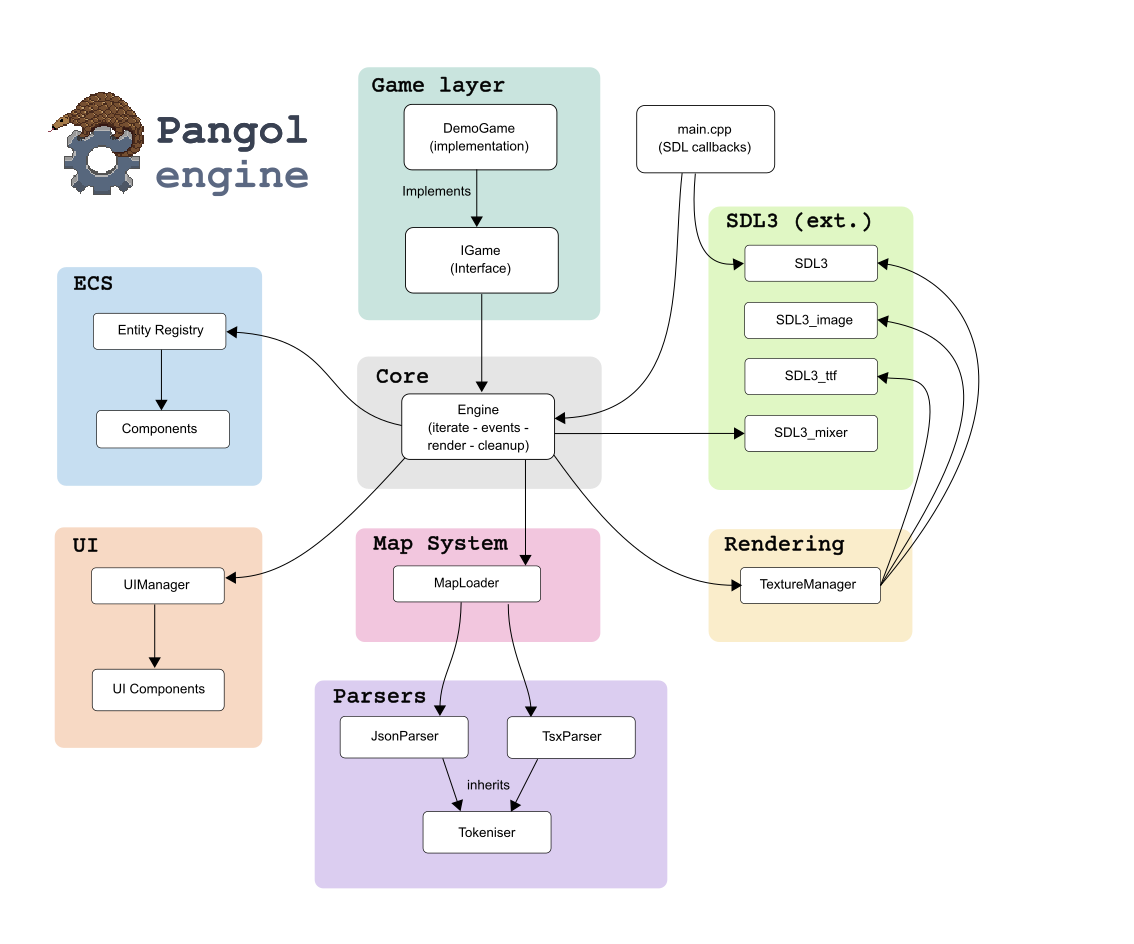
The systems broadly comprise: the engine core, the entity component system (ECS), the map system, the parsers, the user interface (UI) and the rendering helper class (the texture manager). The various SDL libraries are used to interact with the hardware layer in a platform-agnostic way. SDL3 is the main library, SDL_image allows loading images on to SDL surfaces, SDL_ttf facilitates text rendering, and SDL_mixer facilitates audio. These were the only external dependencies used for the project. Initially, I was using entt for the ECS (also used by Minecraft), as well as a json parser and XML parser for working with the map files. Eventually, I replaced these with custom versions that still bear some interface similarities to these original libraries. I did this later on in my C++ journey when I was more comfortable with the language, mainly as an exercise than for practical reasons. Writing parsers for JSON and TSX (a specialised XML format from Tiled maps; not related to TypeScript!) was very much unnecessary, but nonetheless good practice.
The most challenging aspect of this process was writing the Entity Component System (ECS). An ECS describes a collection of entities (that represent game objects such as the player, NPCs, map objects etc.) that hold some number of components (which correspond to the entity’s properties, such as position, sprite, animations, controls and so on). The ‘system’ part manages which entities hold which components, handles creation and cleanup. The main benefit of an ECS are that entities can hold a set of independent functionalities or attributes, and by keeping components close together in memory, they can be iterated and updated much faster. An ECS addresses one of the main criticisms for OOP: complex inheritance hierarchies (something Casey Muratori gives an excellent talk about). Entities are generic; their behaviours and properties are determined by the components that they hold, not by the class that they inherit from. We can create components such as Transform that handles the position of entities, or a Sprite component that handles information about the entity’s sprite. ECSs are popular in game types that typically track lots of entities (such as simulation and strategy games). There are certainly simpler approaches for handling entities, particularly for simple games. Incorporating an ECS into Pangolengine was more to understand how they work, rather than solving a particular performance issue. To use the ECS in the engine, we first need to use the registry to create a new entity (really just an ID) to which components can be added. Creating an entity in the engine is straight forward:
// Get the entity registry
auto& registry = engine->getRegistry();
// The registry creates a new entity ID (essentially just an integer value)
EntityId playerId = registry.create();
Now we can add components, these are the ‘properties’ of the player:
registry.addComponent<Sprite>(
  playerId,                                         // player registry ID
  Engine::mapData.playerObject.spriteSheet.c_str(), // sprite sheet location
  Engine::mapData.playerObject.width,               // sprite width
  Engine::mapData.playerObject.height,              // sprite height
  Engine::mapData.playerObject.spriteOffset,        // how much to shift the sprite so it aligns with the grid
  Engine::mapData.playerObject.animations           // animation properties
);
An example of updating entities of a certain type can be done like so:
// Get all entities with both Sprite and Transform components
auto spriteEntities = registry.getEntitiesWithComponents<Sprite, Transform>();
// Iterate through entities
for (auto entity : spriteEntities) {
 // Get the Sprite entity
  auto& sprite = registry.getComponent<Sprite>(entity);
  // Get the Transform entity
  auto& transform = registry.getComponent<Transform>(entity);
  // Update the sprite with the transform position
  sprite.update(transform);
}
If you’re unfamiliar with C++ syntax, you may notice the types in angle
brackets (e.g. <Sprite> and <Transform>)—these are type inputs to template
functions. The whole ECS.h file is a lean 265 lines of code, but took weeks to
write as I had to get my head around how templates work in C++ (which to a
long-time Python programmer can be somewhat baffling). Template functions
essentially let us write one function that accepts many different input types.
We don’t want to have to write a different function for adding a Sprite
component, and for adding a Transform component for example. Template
functions let us write a general function, while also allowing type-specific
execution paths. Components can be freely written as a new class (with no
interface or inheritance hierarchy). The engine doesn’t place any restrictions
on what functions or properties you need to have in your component
classes—they can be as simple of complex as you like, and the process of
adding components to your entities will use the same function, you will just
have to pass the parameters for that particular component into the function as
arguments.
A key feature of an ECS is that it keeps components close together in memory, which means that we can update them in a memory efficient manner. The lower level function that adds components to the component array looks like this:
T& addComponent(EntityId entityId, T &component) { // Entity ID and component type
  std::size_t index = components.size();
  components.push_back(std::move(component));   // Add the component to the back
  entityToIndex[entityId] = index;              // Update entity-to-index map
  indexToEntity[index] = entityId;              // Update index-to-entity map
  return components[entityToIndex[entityId]];
}
The two-way maps here allow us to perform fast lookups between entity IDs and component array indexes (and vice versa). Adding components is relatively straight-forward, but removing components from entities requires a bit of reshuffling to make sure we don’t create ‘holes’ in our component arrays.
void removeComponent(EntityId entityId) override {
  if (!entityToIndex.contains(entityId)) return; // No entity, nothing to do

  // Determine index to remove, and last index position
  std::size_t indexToRemove = entityToIndex[entityId];
  std::size_t lastIndex = components.size() - 1;

  // We only need to reshuffle things if we aren't removing the last index
  if (indexToRemove != lastIndex) {
    // Move the last index to the index-to-remove position
    components[indexToRemove] = std::move(components[lastIndex]);
    // Get the entity ID and update the maps
    EntityId lastEntityId = indexToEntity[lastIndex];
    entityToIndex[lastEntityId] = indexToRemove;
    indexToEntity[indexToRemove] = lastEntityId;
  }

  // Now remove the last element
  components.pop_back();

  // Remove entity and last index from the maps
  entityToIndex.erase(entityId);
  indexToEntity.erase(lastIndex);
}
When updating all entities (as in the previous snippet), we can be relatively
sure that they will be co-located in memory. This is something that grows in
importance as the number of entities increases. Thinking about memory management
is important for ensuring good performance of game engines, and was something
that I wasn’t used to from my work in bioinformatics. It is important to think
about object lifetimes to avoid memory leaks (you may have encountered software
where memory usage keeps growing indefinitely—most likely a memory leak). As
Python, R and Groovy are garbage-collected languages, this wasn’t something I
was used to thinking about. In the process of working on the game engine, I
encountered several instances of not clearing my objects properly, which caused
memory usage to go up indefinitely while the game ran (even if it was idle, as
objects were being created and not cleared for each iteration of the game loop).
Eventually the game would crash or slows down my PC to a crawl. The memory leaks
that I encountered in the Pangolengine were often textures that weren’t
destroyed. For the Sprite component for example, I implement a simple clean()
function:
void clean() { SDL_DestroyTexture(texture); }
This can be called on the entity in the game implementation when the sprite texture needs to be destroyed (for example, when we load a new map):
// Attempt to get the Sprite component from the entity
Sprite* sprite = registry.tryGetComponent<Sprite>(entityId);
if (sprite) sprite->clean(); // Clean up sprite if it exists
Understanding how RAII
behaviour
works in C++ has also helped with managing memory. These aspects of C++ were
some of the biggest early stumbling blocks for me. In contrast, I found static
typing to be second-nature after getting used to it, which has made it seamless
to add types to my Python code. I was also surprised at just how many errors the
compiler prevented. While C++’s error messages are unnecessarily verbose and not
particularly user-friendly, I found that using an
LSP prevented most compile-time
errors before even running cmake. Most of the time, when the program compiled
it would just work. Of course, there were always logical errors, but those are
usually only apparent when actually playing the game.
The process of writing the engine has been useful in writing research software. Being more aware of memory management has been a help when working with large images, something that I am doing more often working with spatial omics data. Performing image transformations often requires keeping large arrays in memory, so being aware of when copies of arrays are no longer actively required can dramatically reduce memory usage. Since getting familiar with OOP, I had the chance to contribute to some code bases that use the paradigm. I am generally considering the design of tools more from the get-go, rather than letting them organically grow, which can often lead to messy code. As for C++, I haven’t had much need to write it, but understanding what is going on in C or C++ tools is now much easier. There is a comfort in having another tool in the arsenal (C knowledge opens up another rung on the Python optimisation ladder). Understanding and writing software outside of your field can involve a steep learning curve–particularly for disparate fields (such as bioinformatics and game development), but it also provides new tools and perspective for solving problems in your home domain.
Thanks to my partner Dana for proofreading and the idea for the engine name.